2048 (DOS)
Saves are stored in this browser.
Player notes
About this game
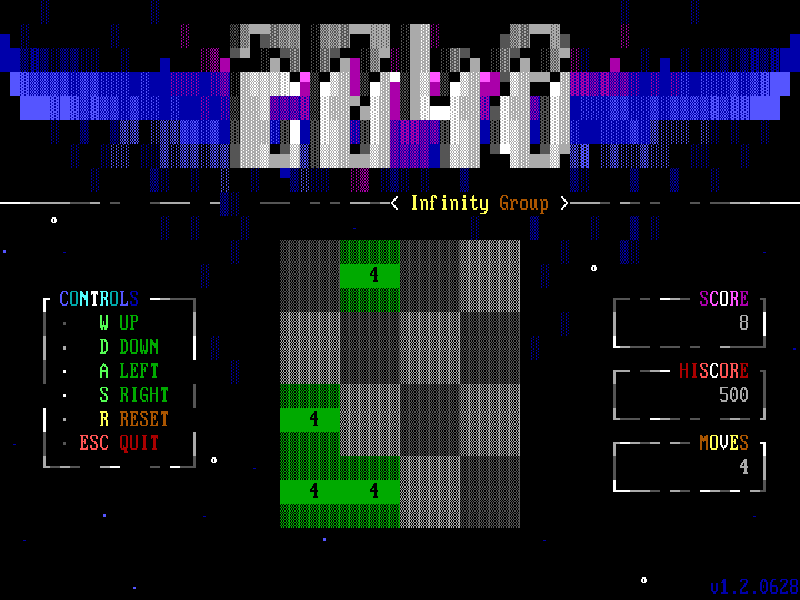
This DOS adaptation of 2048 presents its number grid inside a colourful text-mode interface. Slide tiles in one direction; matching values combine into a larger tile, while the move and score counters help you follow the board. The goal is to create a 2048 tile before running out of useful moves.
Press Enter to leave the title demonstration and begin. The actual controls are W up, A left, S down and D right. The original 1.2 panel mistakenly labels D as down and S as right; the author’s matching source and our input test confirm the normal WASD mapping. R asks to start over. Esc asks to quit and save: answer Y to confirm or N to keep playing.
The executable is the author’s 1.2.0628 BPC build, published in the original release 1.2. Trinh Nguyen’s MIT licence and author README from that same tag are included with the unchanged binary. Saving and reopening the board was checked in one local session; this does not imply cross-device cloud restoration. This edition dates from 2019 and is distinct from the newer 2.0 release.
Start here
Quick tips
Follow W up, A left, S down, D right; the original left-panel D/S captions are swapped.
Choose N at the reset or quit prompt if you want to keep the current board.
Use Esc and Y to save and exit before exporting your game files.
- W
- Slide the board upward.
- A
- Slide the board left.
- S
- Slide the board downward.
- D
- Slide the board right.
- Enter
- Start from the title screen.
- R
- Ask to reset the board.
- Esc
- Ask to quit and save the current board.
- Y / N
- Confirm or cancel a reset or save-and-quit prompt.
Keep playing
Similar Games
Ratings & comments
Help improve this entry
Something not working?
Report a gameplay or information problem. Short reports are enough.
Archive notes
Rights and Source Notes
Browser play is available for this entry.
- Distribution
- MIT
- Browser player
- js-dos · Browser play
- Added to archive
- 2026-11-06
No comments yet. Be the first to share a tip.