The Dungeons of Grimlor 2: The Lich
Saves are stored in this browser.
Player notes
About this game
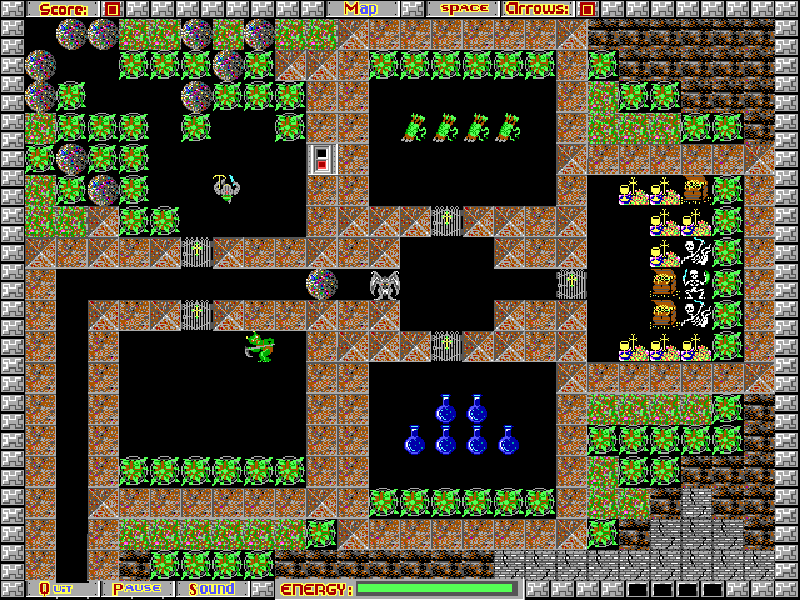
The Dungeons of Grimlor 2: The Lich follows Grimlor through overhead-view passages filled with creatures, locked routes and useful supplies. Move through the dungeon, collect arrows and watch the energy meter while looking for a way deeper into the maze. Corners can provide shelter from approaching enemies.
The arrow keys move Grimlor and set his direction. Space fires an arrow when ammunition is available; M shows the explored map. The original help points out that keys open doors and teleporters, and that some river areas conceal secrets. P pauses, while Q or Esc leaves the current game. The main menu also offers a speed setting.
This is SumWare Software’s 1995 version 1.0 shareware, created by John Reder and Terrell Brace. Choose Episode One: Resurrection with Space, then press 1 for New Game. The other two episode names are advertisements for the registered release and are not included here. Original files and the shareware license are preserved.
Start here
Quick tips
At the episode screen, choose Resurrection with Space; press 1 in its menu to begin.
Collect arrows before firing: Space does not supply ammunition.
Use M to check the explored map, and look for keys before trying locked routes.
- Up / Down / Left / Right
- Move Grimlor and face that direction.
- Space
- Select an episode, fire an available arrow, or dismiss a prompt.
- M
- Show the explored map.
- P
- Pause the game.
- S
- Toggle original game sound.
- 1
- Start a new game from the main menu.
- 2
- Choose Restore Game from the main menu.
- 4
- Open the speed setting from the main menu.
- Q / Esc
- Leave the current game; follow any confirmation or save prompt.
Keep playing
Similar Games
Ratings & comments
Help improve this entry
Something not working?
Report a gameplay or information problem. Short reports are enough.
Archive notes
Rights and Source Notes
Browser play is available for this entry.
- Distribution
- Shareware
- Browser player
- js-dos · Browser play
- Added to archive
- 2026-11-05
No comments yet. Be the first to share a tip.