Thor's Hammer
Saves are stored in this browser.
Player notes
About this game
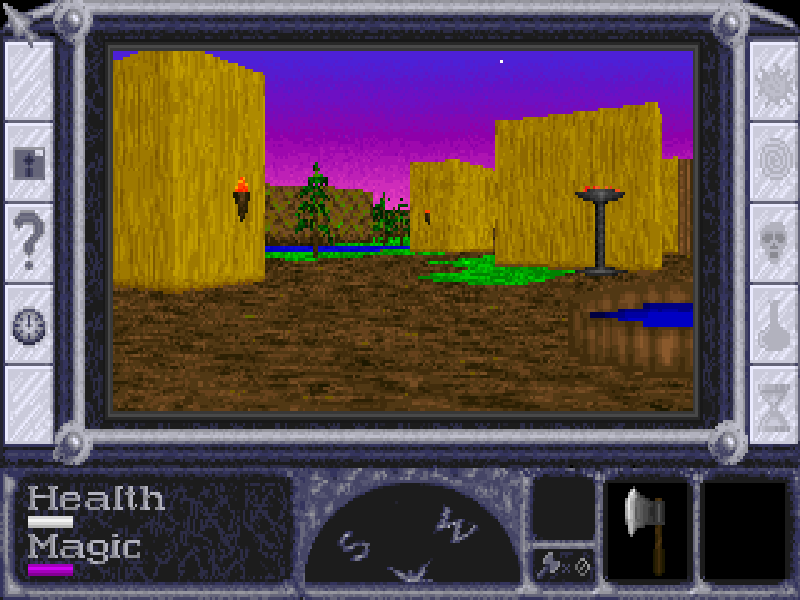
Thor's Hammer puts you inside a fantasy world viewed through a first-person window. The starting village leads into a larger quest involving passages, creatures and magical abilities. Health, magic, equipment and the compass stay visible around the playfield, while the automap records areas you have seen.
Use the arrow keys to walk and turn. Shift makes you run, and Alt changes turning into sideways movement. Ctrl attacks with the equipped weapon when a monster is within reach. Space performs the appropriate action on the object or person directly ahead, such as opening a door or reading a sign. Spells are unavailable until you learn them and have enough magic.
This is Escape Programming's 1.1 shareware release, published by MVP Software, containing Episode 1: The Trial. Select that episode with Enter; Esc skips the opening story. Original files, the manual and the license remain intact. The original license describes a 30-day trial and registration requirement; this is not the registered trilogy. Its historical ordering details are preserved for reference, not presented as a current purchase service.
Start here
Quick tips
Start with Episode 1: The Trial. Esc can skip the opening story.
Use M to review explored areas and the compass to keep track of your direction.
Face an object before pressing Space. Throwing axes and spells require items or abilities acquired during play.
- Up / Down
- Walk forward or backward.
- Left / Right
- Turn left or right.
- Shift
- Run while moving.
- Alt
- Hold with a direction to strafe.
- Ctrl
- Attack with the current weapon at close range.
- Space
- Interact with the person or object directly ahead.
- Enter
- Confirm a menu selection; throw an available axe during play.
- M
- Show the automap of explored areas.
- F1 / F2 / F3 / F4 / F5
- Cast a learned spell if enough magic is available.
- Esc
- Open the disk menu; skip the opening story.
- Mouse left button
- Select interface buttons and menu entries.
Keep playing
Similar Games
Ratings & comments
Help improve this entry
Something not working?
Report a gameplay or information problem. Short reports are enough.
Archive notes
Rights and Source Notes
Browser play is available for this entry.
- Distribution
- Shareware
- Browser player
- js-dos · Browser play
- Added to archive
- 2026-11-05
No comments yet. Be the first to share a tip.