3D Noughts & Crosses
Saves are stored in this browser.
Player notes
About this game
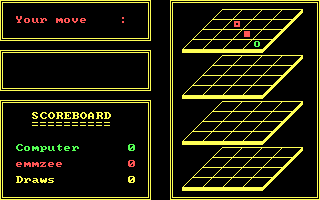
3-D Noughts & Crosses expands the familiar game to four stacked 4-by-4 planes. You and the computer take turns placing marks, trying to connect four in a row through the three-dimensional grid.
Type your name at the opening prompt and press Enter. Move the grid marker with the cursor keys and press Enter to place a mark. Home and End move to the first and last available positions in the current plane; Page Up and Page Down move between planes. Occupied squares are skipped.
When it is your turn, H asks the computer for a suggested move. Check lines that cross several planes as well as rows within a single plane: a move that looks harmless on one board can complete a line through the others. Escape abandons the game.
Start here
Quick tips
Check lines across different planes before placing a mark.
Use H for a suggestion when you cannot spot the next threat.
- Arrow keys
- Move the marker between available squares
- Enter
- Confirm the name or place a mark
- Home / End
- Move to the first / last available square in the current plane
- Page Up / Page Down
- Move to the previous / next plane
- H
- Request a suggested move on your turn
- Escape
- Abandon the current game
Keep playing
Similar Games
Ratings & comments
Help improve this entry
Something not working?
Report a gameplay or information problem. Short reports are enough.
Archive notes
Rights and Source Notes
Browser play uses the archived Freeware release.
- Distribution
- Freeware
- Browser player
- js-dos · Browser play
- Added to archive
- 2026-07-28
No comments yet. Be the first to share a tip.