Drum Blaster
Saves are stored in this browser.
Player notes
About this game
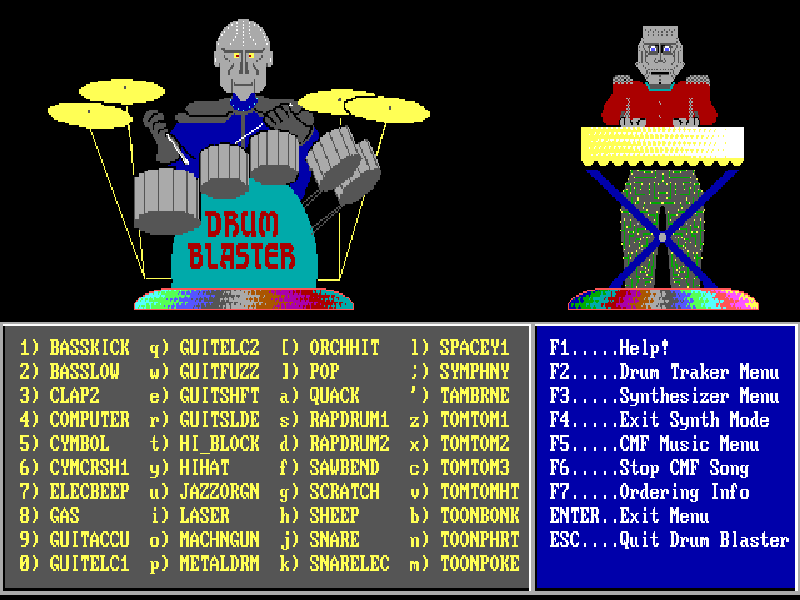
Drum Blaster is a DOS musical toy rather than a score-chasing arcade game. Its forty labeled keys trigger sampled drums, voices and effects, while animated robots play along. You can tap out a rhythm, choose one sample as a pitched instrument, or play over the included music.
F3 opens the synthesizer selector: move the highlight with the arrow keys and press Enter to choose a sample. The same forty keys then play it at different pitches. F4 restores the individual drum sounds. F2 opens the Drum Traker sequences; Up and Down change tempo during playback, and another key stops the sequence. F5 and F6 start and stop CMF backing songs.
This is Drum Blaster 3.0 by Larry Tipton, originally distributed by Epic MegaGames. The author’s 2007 release includes a Creative Commons Attribution-ShareAlike 3.0 license, preserved in the package and linked in the sources. Original programs and samples are unchanged. A keyboard gives access to the full sound bank; the music editor mentioned in the old documentation is not included.
Start here
Quick tips
Use the on-screen list to see which sound belongs to each key.
Try F3, an arrow key and Enter to turn one sample into a pitched instrument; F4 returns to drums.
F6 stops a CMF song. During Drum Traker playback, Up and Down adjust tempo.
- 1 / 2 / 3 / 4 / 5 / 6 / 7 / 8 / 9 / 0
- Trigger the first column of labeled samples.
- Q / W / E / R / T / Y / U / I / O / P
- Trigger the second column of samples or synth notes.
- [ / ] / A / S / D / F / G / H / J / K
- Trigger the third column of samples or synth notes.
- L / ; / ' / Z / X / C / V / B / N / M
- Trigger the fourth column of samples or synth notes.
- F1
- Show the original help.
- F2
- Open the Drum Traker sequence menu.
- F3
- Choose a sample for Synthesizer mode.
- F4
- Return to Drum mode.
- F5
- Choose a CMF backing song.
- F6
- Stop the CMF song.
- Up / Down / Left / Right
- Navigate sample or file menus; Up and Down adjust a playing sequence’s tempo.
- Enter
- Confirm a menu selection.
- Esc
- Cancel a selection or quit from the main screen.
Keep playing
Similar Games
Ratings & comments
Help improve this entry
Something not working?
Report a gameplay or information problem. Short reports are enough.
Archive notes
Rights and Source Notes
Browser play is available for this entry. Official project references are listed below.
- Distribution
- CC BY-SA 3.0
- Attribution
- Drum Blaster © 1991–2007 Larry Tipton; licensed under CC BY-SA 3.0. Original programs and samples preserved.
- Browser player
- js-dos · Browser play
- Added to archive
- 2026-11-05
- Official references
No comments yet. Be the first to share a tip.