Balloon Challenge
Saves are stored in this browser.
Player notes
About this game
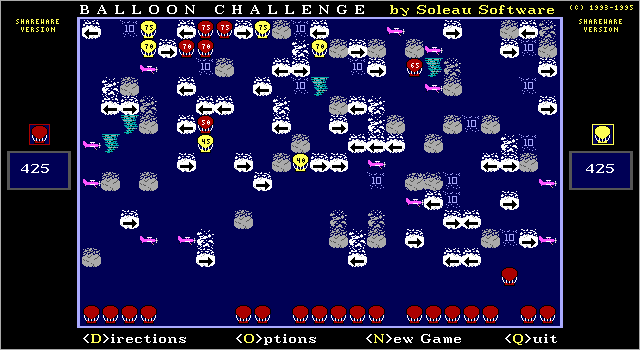
Balloon Challenge turns a sky full of obstacles into a turn-based puzzle. You and the computer each begin with 25 balloons. Select a balloon along the bottom of the board and release it; the height it reaches determines its value. Each row is worth five points, with 75 points available at the top. The game ends after both sides have released their balloons.
Dark clouds stop a climb, while airplanes destroy balloons and move one space each turn. Arrow clouds redirect a balloon, then reverse their own direction. Hurricanes send it to a random position, and clouds marked 10 offer a one-use bonus. A good launch therefore depends on the route above the balloon as well as the height of the nearest opening.
The included v2.0 instructions describe the shareware game against the computer. Two human players were a registered-version feature. Use the arrow keys to choose a balloon and Space to launch it; D opens the directions if you need a reminder.
Start here
Quick tips
Check how an arrow cloud will reverse after your launch.
A balloon blocked directly above its launch pad is removed as grounded.
- Arrow keys
- Select a balloon
- Space
- Release the selected balloon
- D
- Show directions
- O
- Open options, including sound
- N
- Start a new game
- Q
- Quit
Keep playing
Similar Games
Ratings & comments
Help improve this entry
Something not working?
Report a gameplay or information problem. Short reports are enough.
Archive notes
Rights and Source Notes
Browser play uses the archived Shareware release.
- Distribution
- Shareware
- Browser player
- js-dos · Browser play
- Added to archive
- 2026-07-28
No comments yet. Be the first to share a tip.